Half off your first 3 months
Curious about AI Studio & CRM automations? Get 50% off your first three months on any plan.
New accounts only · Ends Sunday, Nov 29
AI Studio for a Local Business: A Tool Breakdown
I tested it myself before I'd recommend it.
It seems like every day there's a new AI tool promising to build your website or sales page in seconds. Most local business owners I talk with are honestly too busy working in their business to build a new site or landing page, and this is where these tools come into play.
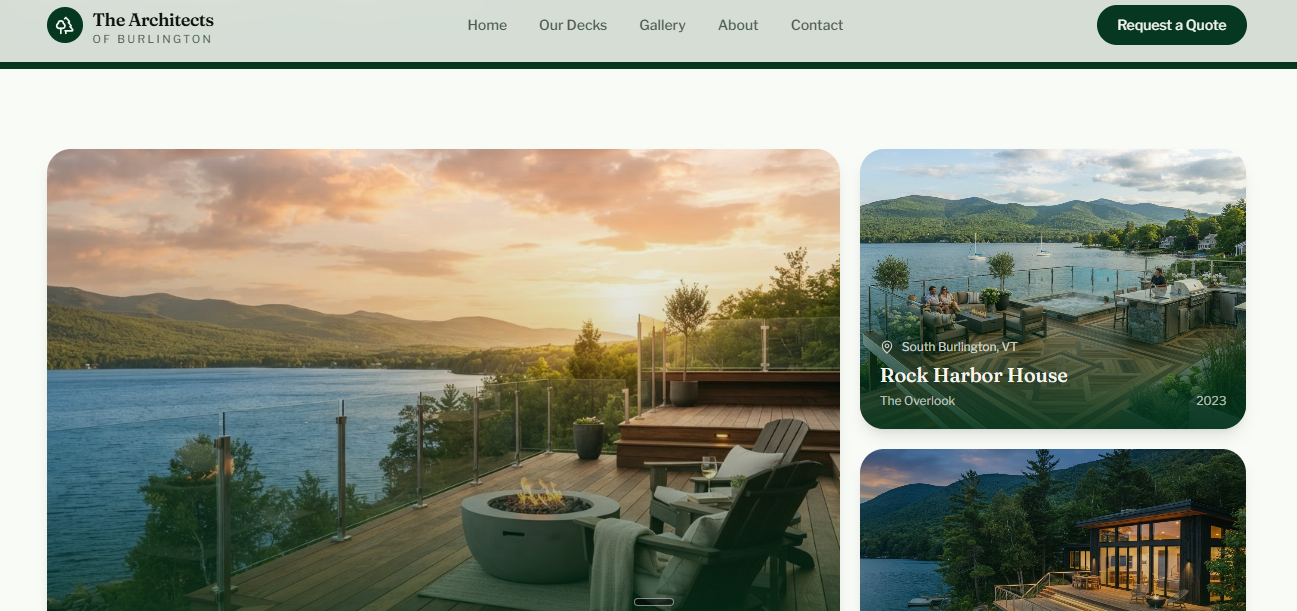
I've been vibe coding for a while now, building with Lovable and Bolt, and I'll continue to use these tools. But I had to try the new AI Studio when it launched, so I put it to the test on a demo business I created to test various products: a deck building company in Burlington, Vermont.
Here's the short answer: it's fantastic, and it gave me a solid starting point. It's not complete, and like most builds it needs human intervention to add and edit the finishing touches, but it really did a great job. I'll share an example prompt so you can do the same for your business or your client's business.
The test: a demo deck building company
Here's the walkthrough, then exactly what I did below it.
Video: building a demo deck company site with one prompt in AI Studio.
Here's exactly what I did, so you can see how it works:
- Created one prompt. I described the business, what it does, what makes it unique and who it serves, and included images and client testimonials.
- AI Studio built the first draft. In minutes, AI Studio spun up a beautiful homepage with several interior pages and, most importantly, a contact form (more on this below).
- Next step: edits. The built-in AI assistant was so helpful with follow-up edits. I just typed what I wanted changed, like “shorten the hero and add a gallery page.”
- I checked the result. A clean, mobile-friendly site that was ready for final touches.
Before this, I was building pages in Lovable and copying and pasting the code into my website builder. With AI Studio, once it's approved, you just hit publish.
What impressed me most: CRM integration
I was amazed at how fast one prompt turned into a beautiful, multi-page website. But what impressed me most wasn't the design. AI Studio lives inside an all-in-one platform that includes a CRM, so your AI Studio site connects the contact form fields directly to your contacts or creates a new contact.
When building the prompt, I described the area I serve. When the contact form was built, it listed all the nearby towns that might ask for a quote and connected every part of the form to my CRM. No separate form tool and no mapping forms field by field.
That's the big difference from the other builders I use. Every quote request goes straight to the same place where I follow up with customers. Or we can kick off an automation, but more on that in a later blog.
Real people when you need help
As much as everything is moving toward AI and automation, I still think personal support is the most helpful.
For example, I've used another software company for years that isn't based in the US. If a question pops up, I enter it into the chat and get a response the next day. If I have any follow-up, it could be another day or two. At times it can be a week before I have an answer to a question, and it can be so frustrating.
With the GoHighLevel software where AI Studio lives, I can click the help button inside the platform and get directly on a one-on-one Zoom.
What I found: what it does well, and where you still matter
The AI handles the structure. You bring the proof that makes people trust you. Here's how it broke down:
What it did well
- •Built a full site from one prompt
- •Wrote clear, readable copy to start from
- •Mobile-friendly right away
- •My requested edits were described to the AI assistant and completed
- •Contact forms tie directly into your CRM
What still needed a human
- •Upload real images from your business as part of your AI prompt
- •Copy needs a review for accuracy and local details
“One thing I won't bend on: never publish AI-written testimonials or made-up numbers. Use your real reviews. It's what earns trust, and it keeps you on the right side of Google and the FTC.”
A few more thoughts
A Lovable pro
One thing I like about Lovable is that when my credits are done for the day, Lovable stops building. AI Studio doesn't stop when you hit a certain limit on the basic plan. Every now and again, there will be a minimal charge.
About the images
I do think this site came out beautifully. The images aren't real, but I wish they were. For most sites you can generally tell if they're AI generated, and I do appreciate the talent of a graphic designer. For me, this is a great starting point for a quick, basic site. It's also a great starting point to pass along to a graphic designer. It gives them the foundation and a great conversation starter, and they can improve it from there. It will save a lot of back and forth.
Your turn: the simple system that works for any local business
This is the general process, step by step. It's great for any business, whether you're a contractor, a coach, a restaurant, you name it.
- Gather your business details. Business name, services, service area, contact info, what makes you unique, why clients should work with you, and photos.
- Start your free trial with this link. Click here to start your free trial.
- Write one detailed prompt. Use my template below, fill in the blanks and attach your photos and your brand guide if you have one, or just describe your colors, fonts and tone of voice.
- Review. Note anything that doesn't sound like you.
- Fix it with the AI assistant. Just say what you want to edit.
- Update testimonials with your actual reviews. If they weren't included in the prompt, add them here.
- Connect your domain and publish.
My copy-and-paste prompt template
"I'm [a marketing consultant / the business owner] and I'm building a website for [Business Name].

[Describe your business, what makes you unique and why people should call you first.]

Please include [the pages you want, like Home, Services, About, Gallery and Contact].

The main call to action should be [your CTA, like "Get a Free Quote"].

Please use the attached images and the testimonials below for the site.

[Paste your real reviews here.]

[If you have a brand guide, upload it too so AI Studio has design direction and your brand voice.]"
Straight answers to the questions I get most
These are the questions I actually get asked, answered the way I'd answer them on a call.
Two ways forward
You can do this yourself, or we can do it for you. Either way, you're not on your own.
About Magnetic Strategies
Magnetic Strategies is a Google Ads and local SEO agency helping local businesses attract new leads. We also help business owners choose AI tools and set up workflows to help them scale.